Tutorial data in PyARPES#
As of v4, PyARPES includesh seven samples of data you can use to start learning how to conduct an analysis. Realism is important in tutorials, so PyARPES includes common types of data you’ll produce during experiments at synchrotrons/your lab.
cut: an Energy and momentum “cut” at laser-UV photon energies across the gamma point of Bi_2Se_3.cut2: an Energy and momentum “cut” of two-photon photoemission spectra of Xe covered Au(111) .map: an angle-angle “map” at soft X-ray photon energies of a metalmap2: an angle-angle “map” at soft X-ray photon energies of bilayer graphene on the solid.photon_energy: an angle-photon energy scan at soft X-ray energies from a metalnano_xps: a scanning XPS image at soft X-ray energies from WS2temperature_dependence: a temperature resolved ARPES cut at soft X-ray energies
All samples are moderately binned to respect user’s bandwidth and repository hosting constraints.
If you would like to contribute a piece of sample data or want to request a particular type of data be available in future release, please let the maintainers know.
Demo analyses use only these included data samples. This means you can cut-and-paste or download analysis notebooks to try them on your computer.
Each analysis notebooks has a few learning exercises in a section at the end.
Accessing tutorial data#
To access tutorial data here or in your notebooks, you just import example_data from arpes.io.
[1]:
import arpes
from arpes.io import example_data

bi2se3_cut = example_data.cut  # <- here, take `cut` above
# any of `map`, `photon_energy`,
# `nano_xps`, or
# `temperature_dependence` will work
Activating auto-logging. Current session state plus future input saved.
Filename       : logs/unnamed_2026-03-24_23-30-56.log
Mode           : backup
Output logging : False
Raw input log  : False
Timestamping   : False
State          : active
[2]:
# the last line of a Jupyter cell is "printed", printing a
# piece of ARPES data gives a rich representation
bi2se3_cut
[2]:
<xarray.Dataset> Size: 465kB
Dimensions:   (eV: 240, phi: 240)
Coordinates:
  * eV        (eV) float64 2kB -0.4256 -0.4233 -0.4209 ... 0.1256 0.1279 0.1302
  * phi       (phi) float64 2kB 0.2217 0.2234 0.2251 ... 0.6353 0.637 0.6388
    chi       float64 8B -0.1091
    alpha     int64 8B 0
    beta      float64 8B 0.0
    theta     float64 8B 0.0
    z         float64 8B -3.4e-05
    y         float64 8B 34.75
    x         float64 8B -0.7704
    hv        float64 8B 5.93
    psi       int64 8B 0
Data variables:
    time      float64 8B 0.0
    spectrum  (phi, eV) int64 461kB 1 2 0 6 45 72 35 37 ... 76 82 95 84 74 72 42
Attributes: (12/97)
    file:                      /home/docs/checkouts/readthedocs.org/user_buil...
    location:                  ALG-MC
    BITPIX:                    8
    NAXIS:                     0
    START_T:                   2/3/2016 1:45:34 PM
    START_TS:                  3537380734.727
    ...                        ...
    perpendicular_deflectors:  False
    analyzer_radius:           150
    analyzer_type:             hemispherical
    mcp_voltage:               nan
    probe_linewidth:           0.015
chi_offset: -0.10909301748228785[3]:
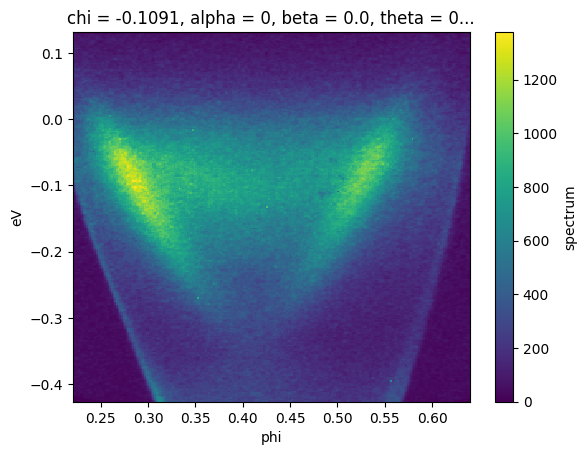
# just transpose to a more natural axis order with `.T` and plot
bi2se3_cut.spectrum.T.plot()
[3]:
<matplotlib.collections.QuadMesh at 0x732a5834e780>
Exercises#
The PyARPES data model#
Look through the HTML representation of
example_data.cut. How do the coordinates correspond to the PyARPES spectral representation?Skim the attrs section from the HTML representation of
example_data.cutPyARPES relies on
xarrayto provide it’s “Wave” representation, have a look at thexarraydocumentation to learn how to manipulate them.